Ver carrito
0
Productos
Sydney Dedicated Servers
Melbourne Dedicated Servers
Perth Dedicated Servers
Adelaide Dedicated Servers
Brisbane Dedicated Servers
Auckland Dedicated Servers
Singapore Dedicated Servers
Tokyo Dedicated Servers
Hong Kong Dedicated Servers
Los Angeles Dedicated Servers
New York Dedicated Servers
Ashburn Dedicated Servers
Dallas Dedicated Servers
Miami Dedicated Servers
Chicago Dedicated Servers
Seattle Dedicated Servers
Amsterdam Dedicated Servers
Frankfurt Dedicated Servers
London Dedicated Servers
Paris Dedicated Servers
Milan Dedicated Servers
Warsaw Dedicated Servers
Atlanta Dedicated Servers
Dominios
Registrar un nuevo dominio
Transferir dominios
Soporte
Contacto
-----
Base de conocimientos
Registrarse
Iniciar sesión
How to setup your server for the first time
Inicio del portal
Base de conocimientos
Game Servers
Project Zomboid
How to setup your server for the first time
Soporte
Mis tickets de soporte
Anuncios
Base de conocimientos
Descargas
Estado de la red
Abrir ticket
The following basic guide will show you how to setup your Project Zomboid server for the first time
Step 1:
Log into your game panel
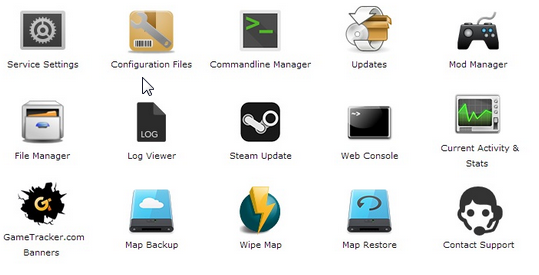
Step 2:
Select 'Web Console' from the icons
Step 3:
Once in the Web Console you will be prompted for a admin password. Enter a password you can remember
Step 4:
Your service should now be ready to join and use
¿Le ha resultado útil esta respuesta?
10 Los usuarios encontraron esto útil (32 Votos)
Sí
No
Go Dedicated uses cookies to provide a tailored experience on our website.
Learn more
Continuar
Generar contraseña
La contraseña debe tener entre 8 y 64 caracteres
Longitud de la contraseña
Contraseña generada
Generar contraseña nueva
Copiar