شاهد العربة
0
الخدمات
Sydney Dedicated Servers
Melbourne Dedicated Servers
Perth Dedicated Servers
Adelaide Dedicated Servers
Brisbane Dedicated Servers
Auckland Dedicated Servers
Singapore Dedicated Servers
Tokyo Dedicated Servers
Hong Kong Dedicated Servers
Los Angeles Dedicated Servers
New York Dedicated Servers
Ashburn Dedicated Servers
Dallas Dedicated Servers
Miami Dedicated Servers
Chicago Dedicated Servers
Seattle Dedicated Servers
Amsterdam Dedicated Servers
Frankfurt Dedicated Servers
London Dedicated Servers
Paris Dedicated Servers
Milan Dedicated Servers
Warsaw Dedicated Servers
Atlanta Dedicated Servers
النطاقات
تسجيل نطاق جديد
نقل نطاق إلينا
الدعم الفني
راسلنا
-----
مكتبة الشروحات
الإشتراك
تسجيل الدخول
How to setup your server for the first time
البوابة الرئيسية
مكتبة الشروحات
Game Servers
Project Zomboid
How to setup your server for the first time
الدعم الفني
تذاكر الدعم الفني
أخبار وإعلانات
مكتبة الشروحات
مكتبة الملفات
حالة الشبكة
فتح تذكرة
The following basic guide will show you how to setup your Project Zomboid server for the first time
Step 1:
Log into your game panel
Step 2:
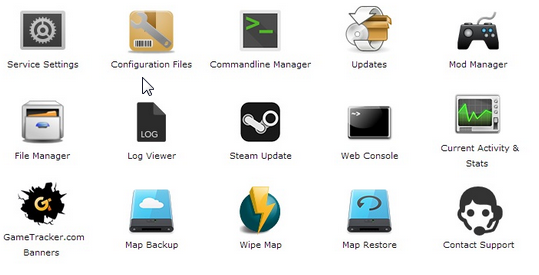
Select 'Web Console' from the icons
Step 3:
Once in the Web Console you will be prompted for a admin password. Enter a password you can remember
Step 4:
Your service should now be ready to join and use
هل كانت المقالة مفيدة ؟
10 أعضاء وجدوا هذه المقالة مفيدة (32 التصويتات)
نعم
لا
Go Dedicated uses cookies to provide a tailored experience on our website.
Learn more
الاستمرار
إنشاء كلمة مرور
يرجى إدخال رقم بين 8 و 64 لطول كلمة المرور
طول كلمة المرور
كلمة المرور التي تم إنشاؤها
إنشاء كلمة مرور جديدة
نسخة