Pregled košarice
0
Products
Sydney Dedicated Servers
Melbourne Dedicated Servers
Perth Dedicated Servers
Adelaide Dedicated Servers
Brisbane Dedicated Servers
Auckland Dedicated Servers
Singapore Dedicated Servers
Tokyo Dedicated Servers
Hong Kong Dedicated Servers
Los Angeles Dedicated Servers
New York Dedicated Servers
Ashburn Dedicated Servers
Dallas Dedicated Servers
Miami Dedicated Servers
Chicago Dedicated Servers
Seattle Dedicated Servers
Amsterdam Dedicated Servers
Frankfurt Dedicated Servers
London Dedicated Servers
Paris Dedicated Servers
Milan Dedicated Servers
Warsaw Dedicated Servers
Atlanta Dedicated Servers
Domene
Registriraj novu domenu
Premjestite domenu kod nas
Podrška
Kontaktirajte nas
-----
Baza znanja
Registtracija
Prijava
How to setup your server for the first time
Početna WHMCS
Baza znanja
Game Servers
Project Zomboid
How to setup your server for the first time
Podrška
Moji zahtjevi za podršku
Obavijesti
Baza znanja
Preuzimanja
Status mreže
Podnesi zahjtev
The following basic guide will show you how to setup your Project Zomboid server for the first time
Step 1:
Log into your game panel
Step 2:
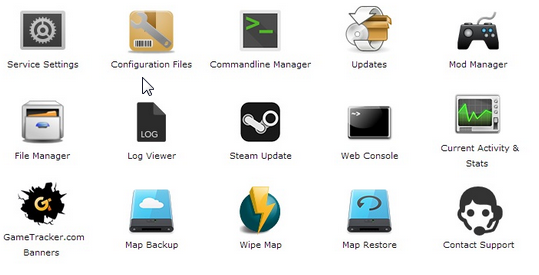
Select 'Web Console' from the icons
Step 3:
Once in the Web Console you will be prompted for a admin password. Enter a password you can remember
Step 4:
Your service should now be ready to join and use
Je li Vam ovaj odgovor pomogao?
10 Korisnici koji smatraju članak korisnim (32 Glasovi)
Da
Ne
Go Dedicated uses cookies to provide a tailored experience on our website.
Learn more
Nastavi
Generiraj lozinku
Molimo unesite broj između 8 i 64 za duljinu lozinke
Duljina lozinke
Generirana lozinka
Generiraj novu lozinku
Kopiraj