Coșul meu
0
Produse
Sydney Dedicated Servers
Melbourne Dedicated Servers
Perth Dedicated Servers
Adelaide Dedicated Servers
Brisbane Dedicated Servers
Auckland Dedicated Servers
Singapore Dedicated Servers
Tokyo Dedicated Servers
Hong Kong Dedicated Servers
Los Angeles Dedicated Servers
New York Dedicated Servers
Ashburn Dedicated Servers
Dallas Dedicated Servers
Miami Dedicated Servers
Chicago Dedicated Servers
Seattle Dedicated Servers
Amsterdam Dedicated Servers
Frankfurt Dedicated Servers
London Dedicated Servers
Paris Dedicated Servers
Milan Dedicated Servers
Warsaw Dedicated Servers
Atlanta Dedicated Servers
Domenii
Înregistrare domeniu nou
Transfer domenii
Asistență
Contact
-----
Biblioteca de cunoștințe
Înregistrare
Autentificare
How to setup your server for the first time
Portal clienți
Biblioteca de cunoștințe
Game Servers
Project Zomboid
How to setup your server for the first time
Asistență
Tichetele mele
Anunțuri
Biblioteca de cunoștințe
Fișiere
Starea sistemelor
Deschide Tichet
The following basic guide will show you how to setup your Project Zomboid server for the first time
Step 1:
Log into your game panel
Step 2:
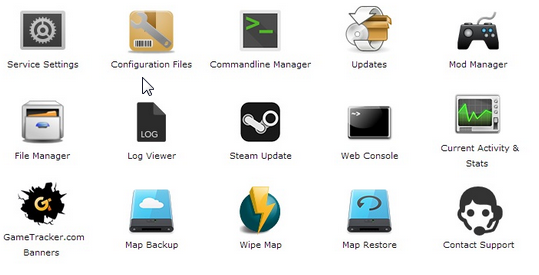
Select 'Web Console' from the icons
Step 3:
Once in the Web Console you will be prompted for a admin password. Enter a password you can remember
Step 4:
Your service should now be ready to join and use
Răspunsul a fost util?
10 utilizatori au considerat informația utilă (32 Voturi)
Da
Nu
Go Dedicated uses cookies to provide a tailored experience on our website.
Learn more
Continuare
Generare Parolă
Vă rugăm să introduceți un număr între 8 și 64 caractere pentru lungimea parolei
Lungimea Parolei
Parola Generată
Generați o noua parolă
Copiază