Səbətə bax
0
Products
Sydney Dedicated Servers
Melbourne Dedicated Servers
Perth Dedicated Servers
Adelaide Dedicated Servers
Brisbane Dedicated Servers
Auckland Dedicated Servers
Singapore Dedicated Servers
Tokyo Dedicated Servers
Hong Kong Dedicated Servers
Los Angeles Dedicated Servers
New York Dedicated Servers
Ashburn Dedicated Servers
Dallas Dedicated Servers
Miami Dedicated Servers
Chicago Dedicated Servers
Seattle Dedicated Servers
Amsterdam Dedicated Servers
Frankfurt Dedicated Servers
London Dedicated Servers
Paris Dedicated Servers
Milan Dedicated Servers
Warsaw Dedicated Servers
Atlanta Dedicated Servers
Domen adı
Domen əldə et
Domen transferi
Yardım
Əlaqə
-----
Məlumat bazası
Qeydiyyat
Giriş
How to setup your server for the first time
Azerbaijan Hosting Provider
Məlumat bazası
Game Servers
Project Zomboid
How to setup your server for the first time
Yardım
Dəstək sorğularım
Elanlar
Məlumat bazası
Yüklənilənlər
Server/Şəbəkə vəziyyəti
Yeni sorğu aç
The following basic guide will show you how to setup your Project Zomboid server for the first time
Step 1:
Log into your game panel
Step 2:
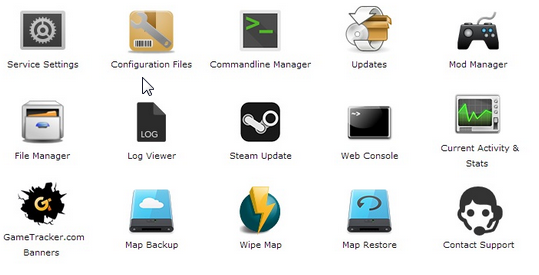
Select 'Web Console' from the icons
Step 3:
Once in the Web Console you will be prompted for a admin password. Enter a password you can remember
Step 4:
Your service should now be ready to join and use
Bu cavab sizə kömək etdi?
10 istifadəçi bunu faydalı hesab edir (32 səs)
Hə
Yox
Go Dedicated uses cookies to provide a tailored experience on our website.
Learn more
Davam et
Şifrə yaradın
Zəhmət olmasa şifrə uzunluğu üçün 8 ilə 64 arasında bir rəqəm daxil edin
Şifrə uzunluğu
Şifrə yaradın
Yeni şifrə yaradın
Kopyalayın