Visualizar carrinho
0
Produtos
Sydney Dedicated Servers
Melbourne Dedicated Servers
Perth Dedicated Servers
Adelaide Dedicated Servers
Brisbane Dedicated Servers
Auckland Dedicated Servers
Singapore Dedicated Servers
Tokyo Dedicated Servers
Hong Kong Dedicated Servers
Los Angeles Dedicated Servers
New York Dedicated Servers
Ashburn Dedicated Servers
Dallas Dedicated Servers
Miami Dedicated Servers
Chicago Dedicated Servers
Seattle Dedicated Servers
Amsterdam Dedicated Servers
Frankfurt Dedicated Servers
London Dedicated Servers
Paris Dedicated Servers
Milan Dedicated Servers
Warsaw Dedicated Servers
Atlanta Dedicated Servers
Domínios
Registrar um novo domínio
Transfira Domínios para Nós
Suporte
Entre em Contato
-----
Base de Conhecimento
Registrar
Entrar
How to setup your server for the first time
Página inicial do portal
Base de Conhecimento
Game Servers
Project Zomboid
How to setup your server for the first time
Suporte
Meus Tickets de Suporte
Anúncios
Base de Conhecimento
Downloads
Status da Rede
Abrir Ticket
The following basic guide will show you how to setup your Project Zomboid server for the first time
Step 1:
Log into your game panel
Step 2:
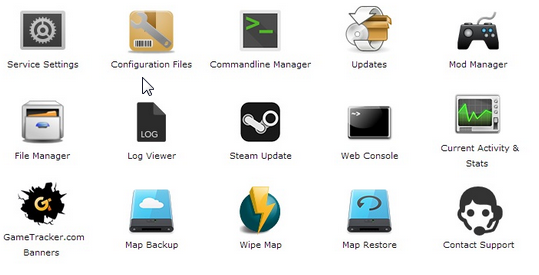
Select 'Web Console' from the icons
Step 3:
Once in the Web Console you will be prompted for a admin password. Enter a password you can remember
Step 4:
Your service should now be ready to join and use
Esta resposta foi útil?
10 Os usuários acharam isso útil (32 Votos)
Sim
Não
Go Dedicated uses cookies to provide a tailored experience on our website.
Learn more
Continuar
Gerar Senha
Por favor, insira um número entre 8 e 64 caracteres para o comprimento da senha
Comprimento da Senha
Senha Gerada
Gerar nova senha
Copiar