مشاهده کارت خرید
0
Products
Sydney Dedicated Servers
Melbourne Dedicated Servers
Perth Dedicated Servers
Adelaide Dedicated Servers
Brisbane Dedicated Servers
Auckland Dedicated Servers
Singapore Dedicated Servers
Tokyo Dedicated Servers
Hong Kong Dedicated Servers
Los Angeles Dedicated Servers
New York Dedicated Servers
Ashburn Dedicated Servers
Dallas Dedicated Servers
Miami Dedicated Servers
Chicago Dedicated Servers
Seattle Dedicated Servers
Amsterdam Dedicated Servers
Frankfurt Dedicated Servers
London Dedicated Servers
Paris Dedicated Servers
Milan Dedicated Servers
Warsaw Dedicated Servers
Atlanta Dedicated Servers
دامنه ها
ثبت دامنه جدید
انتقال دامنه به ما
پشتیبانی
تماس با ما
-----
مرکز آموزش
ثبت نام
ورود
How to setup your server for the first time
اعضا
مرکز آموزش
Game Servers
Project Zomboid
How to setup your server for the first time
پشتیبانی
پشتیبانی
اخبار
مرکز آموزش
دانلود فایل
وضعیت شبکه
ارسال تیکت پشتیبانی
The following basic guide will show you how to setup your Project Zomboid server for the first time
Step 1:
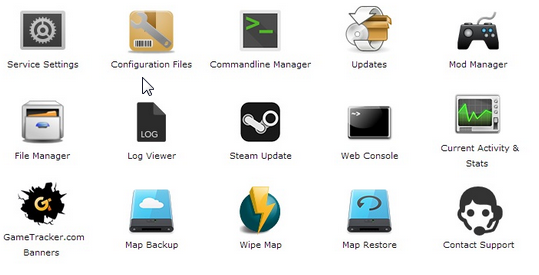
Log into your game panel
Step 2:
Select 'Web Console' from the icons
Step 3:
Once in the Web Console you will be prompted for a admin password. Enter a password you can remember
Step 4:
Your service should now be ready to join and use
آیا این پاسخ به شما کمک کرد؟
10 کاربر این را مفید یافتند (32 نظرات)
بلی
خیر
Go Dedicated uses cookies to provide a tailored experience on our website.
Learn more
ادامه
ایجاد گذرواژه
لطفاً برای طول گذرواژه عددی بین 8 تا 64 وارد کنید
طول رمز عبور
رمز عبور ایجاد شده
ایجاد رمز عبور جدید
کپی