Zobrazit košík
0
Products
Sydney Dedicated Servers
Melbourne Dedicated Servers
Perth Dedicated Servers
Adelaide Dedicated Servers
Brisbane Dedicated Servers
Auckland Dedicated Servers
Singapore Dedicated Servers
Tokyo Dedicated Servers
Hong Kong Dedicated Servers
Los Angeles Dedicated Servers
New York Dedicated Servers
Ashburn Dedicated Servers
Dallas Dedicated Servers
Miami Dedicated Servers
Chicago Dedicated Servers
Seattle Dedicated Servers
Amsterdam Dedicated Servers
Frankfurt Dedicated Servers
London Dedicated Servers
Paris Dedicated Servers
Milan Dedicated Servers
Warsaw Dedicated Servers
Atlanta Dedicated Servers
Domény
Registrace nové domény
Převod domén k nám
Podpora
Kontaktujte nás
-----
Databáze řešení
Registrace
Přihlášení
How to setup your server for the first time
Domovská stránka portálu
Databáze řešení
Game Servers
Project Zomboid
How to setup your server for the first time
Podpora
Moje support tickety
Oznámení
Databáze řešení
Soubory pro stažení
Stav systému
Otevřít ticket
The following basic guide will show you how to setup your Project Zomboid server for the first time
Step 1:
Log into your game panel
Step 2:
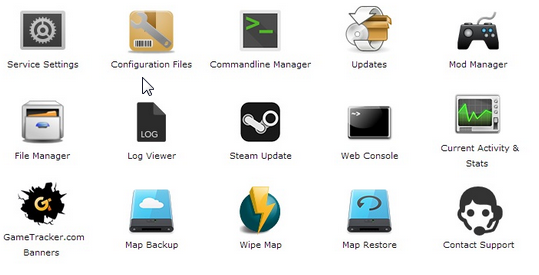
Select 'Web Console' from the icons
Step 3:
Once in the Web Console you will be prompted for a admin password. Enter a password you can remember
Step 4:
Your service should now be ready to join and use
Byla tato odpověď nápomocná?
10 Uživatelům pomohlo (32 Hlasů)
Ano
Ne
Go Dedicated uses cookies to provide a tailored experience on our website.
Learn more
Pokračovat
Generovat heslo
Zadejte prosím číslo mezi 8 a 64 pro délku hesla
Délka hesla
Vygenerované heslo
Vygenerovat nové heslo
Kopírovat