Visualizza Carrello
0
Products
Sydney Dedicated Servers
Melbourne Dedicated Servers
Perth Dedicated Servers
Adelaide Dedicated Servers
Brisbane Dedicated Servers
Auckland Dedicated Servers
Singapore Dedicated Servers
Tokyo Dedicated Servers
Hong Kong Dedicated Servers
Los Angeles Dedicated Servers
New York Dedicated Servers
Ashburn Dedicated Servers
Dallas Dedicated Servers
Miami Dedicated Servers
Chicago Dedicated Servers
Seattle Dedicated Servers
Amsterdam Dedicated Servers
Frankfurt Dedicated Servers
London Dedicated Servers
Paris Dedicated Servers
Milan Dedicated Servers
Warsaw Dedicated Servers
Atlanta Dedicated Servers
Domini
Registra un Nuovo Dominio
Trasferisci da noi un Nuovo Dominio
Assistenza
Contattaci!
-----
Archivio Domande
Registrati
Accedi
How to setup your server for the first time
Home
Archivio Domande
Game Servers
Project Zomboid
How to setup your server for the first time
Assistenza
I miei ticket
Comunicazioni
Archivio Domande
Download
Stato del Network
Apri Ticket
The following basic guide will show you how to setup your Project Zomboid server for the first time
Step 1:
Log into your game panel
Step 2:
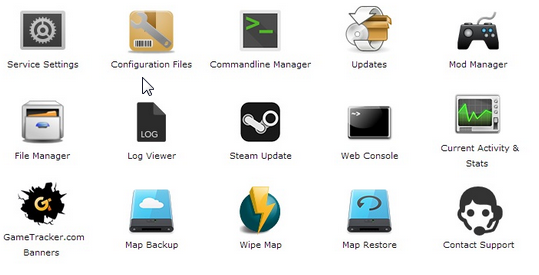
Select 'Web Console' from the icons
Step 3:
Once in the Web Console you will be prompted for a admin password. Enter a password you can remember
Step 4:
Your service should now be ready to join and use
Hai trovato utile questa risposta?
10 Utenti hanno trovato utile questa risposta (32 Voti)
Sì
No
Go Dedicated uses cookies to provide a tailored experience on our website.
Learn more
Continua
Genera password
Inserisci un numero compreso tra 8 e 64 per la lunghezza della password
Lunghezza della password
Password generata
Genera una nuova password
Copia