View Cart
0
Products
Sydney Dedicated Servers
Melbourne Dedicated Servers
Perth Dedicated Servers
Adelaide Dedicated Servers
Brisbane Dedicated Servers
Auckland Dedicated Servers
Singapore Dedicated Servers
Tokyo Dedicated Servers
Hong Kong Dedicated Servers
Los Angeles Dedicated Servers
New York Dedicated Servers
Ashburn Dedicated Servers
Dallas Dedicated Servers
Miami Dedicated Servers
Chicago Dedicated Servers
Seattle Dedicated Servers
Amsterdam Dedicated Servers
Frankfurt Dedicated Servers
London Dedicated Servers
Paris Dedicated Servers
Milan Dedicated Servers
Warsaw Dedicated Servers
Atlanta Dedicated Servers
Domains
Register a New Domain
Transfer Domains to Us
Support
Contact Us
-----
Knowledgebase
Register
Login
How to setup your server for the first time
Portal Home
Knowledgebase
Game Servers
Project Zomboid
How to setup your server for the first time
Support
My Support Tickets
Announcements
Knowledgebase
Downloads
Network Status
Open Ticket
The following basic guide will show you how to setup your Project Zomboid server for the first time
Step 1:
Log into your game panel
Step 2:
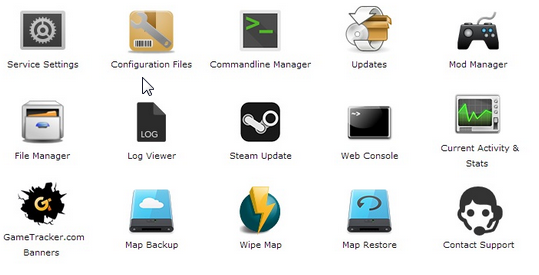
Select 'Web Console' from the icons
Step 3:
Once in the Web Console you will be prompted for a admin password. Enter a password you can remember
Step 4:
Your service should now be ready to join and use
Was this answer helpful?
10 Users Found This Useful (32 Votes)
Yes
No
Go Dedicated uses cookies to provide a tailored experience on our website.
Learn more
Continue
Generate Password
Please enter a number between 8 and 64 for the password length
Password Length
Generated Password
Generate new password
Copy