
Chat Commands
- /password serverpass or /pass serverpass (serverpass being the password configured for the server)
Sends server password attempt to the server for verification.
You can configure the chat name, settings, and messages in the cfg_password.txt file under the save/oxide/data directory.
NOTE: The default password is oxide
Default Configuration
Code (text):
{
 "Settings":{
  "ChatName":"Server",
  "Password":"oxide",
  "GracePeriod":"30",
  "Attempts":"3",
  "Punishment":"kick",
  "HideChat":"true",
  "BlockMovement":"true"
 },
 "Messages":{
  "PasswordPrompt":"Please enter the server password using /password:",
  "ValidPassword":"Password accepted! Welcome to the server",
  "InvalidPassword":"You have entered an incorrect password."
 }
}
 "Settings":{
  "ChatName":"Server",
  "Password":"oxide",
  "GracePeriod":"30",
  "Attempts":"3",
  "Punishment":"kick",
  "HideChat":"true",
  "BlockMovement":"true"
 },
 "Messages":{
  "PasswordPrompt":"Please enter the server password using /password:",
  "ValidPassword":"Password accepted! Welcome to the server",
  "InvalidPassword":"You have entered an incorrect password."
 }
}
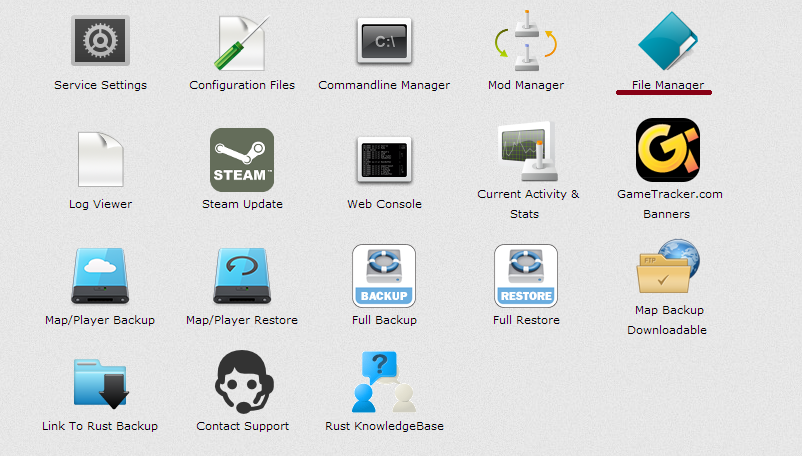
To find this code follow these steps:
1. Open TCadmin
2. Open File manager
3. Open cfg_password.txt
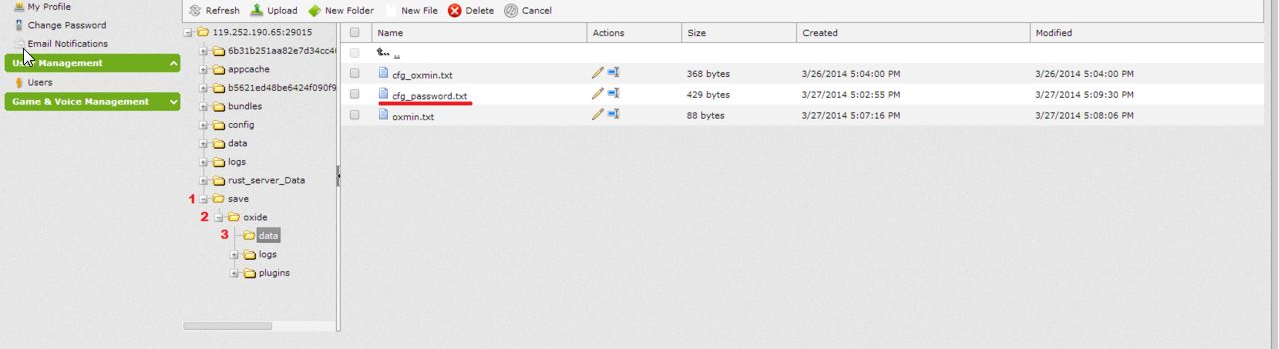
Once you are there you can have a play with the code above!
3. Open cfg_password.txt
Once you are there you can have a play with the code above!


