
Such as stopping / starting / restarting, accessing KVM and the control panel and logging into our dedicated control panel.
Step 1:
Log into your billing account and navigate to the dedicated server product you wish to control
Step 2:
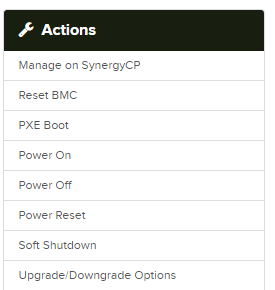
You will be presented with the following on the main screen.
Step 3:
From this area you can perform a number of actions on your dedicated server.
We do strongly suggest logging into the dedicated control panel, as this offers more features.
Boot:Â Turn on your dedicated server
Reboot:Â Restart your dedicated server (Please note this is a force restart)
Shutdown:Â Shutdown your dedicated server (Please note this is a force shutdown)
Manage on SynergyCP:Â Access the dedicated server control panel.


